
ESP32-S31 Edge AI Vision Terminal

This content is AI-translated and may differ from the original.
ESP32-S31 Edge AI Vision Terminal
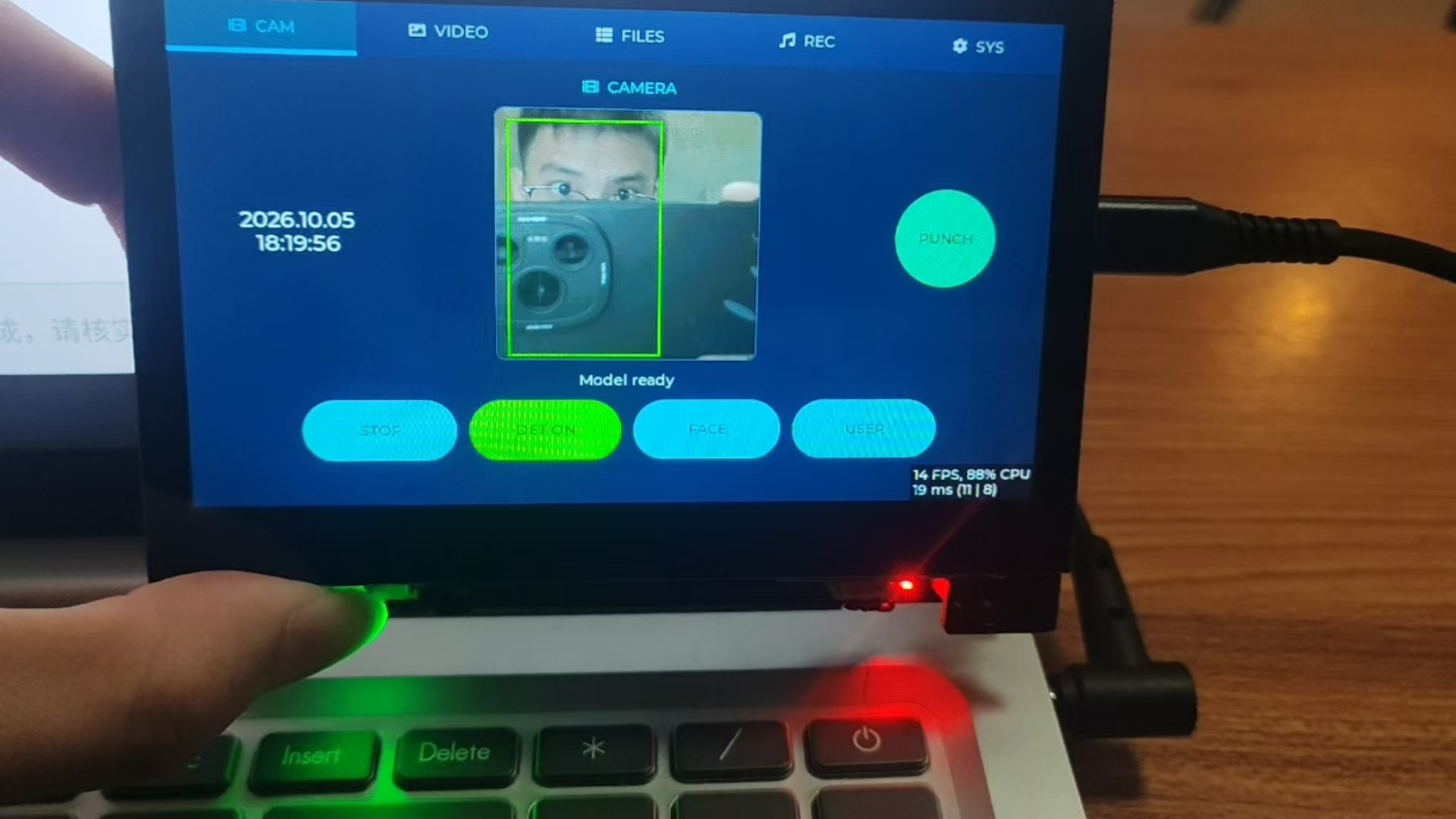
An edge visual intelligent terminal developed based on ESP32-S31-Korvo-1, equipped with an OV3660 camera and a 4.3‑inch 800×480 touch screen. It leverages esp-dl to perform offline face and gesture AI inference, and integrates XiaoZhi AI for cloud‑based dialogue. It supports photo and video capture, face check‑in, web backend management, dynamic wallpapers, and a full set of features. The overall project follows the AI Agent automated development closed‑loop specifications.
Core Features
- Face Recognition Check‑in System: Supports face enrollment, three‑capture three‑verification quality checks; upon successful recognition automatically saves a check‑in photo and generates a CSV check‑in log, using SNTP to obtain trusted time; supports viewing, deleting, and reconciling check‑in records, with the face database stored on the SD card, up to 10 face sets.
- Image Capture: OV3660 camera dual‑mode switching, 240×240 low resolution for AI detection framing, 720P high‑definition mode supports JPEG photos and MJPEG‑format AVI video recording.
- Gesture Recognition: Offline palm detection + MobileNetV2 gesture classification, with real‑time overlay of detection boxes and gesture confidence information on the screen, using an independent model tier that does not mix with face enrollment functionality.
- Media and Recording: SD card file management, preview and playback of images, videos, and recordings; local WAV recording, MP3 audio playback, with audio channels using a lease‑based mutual exclusion scheduling to avoid multi‑stream audio contention.
- XiaoZhi AI Dialogue: Integrated with the XiaoZhi large model, supports voice conversation, can control onboard peripherals via voice, accompanied by an independent AI floating‑window interaction interface.
- Network Capabilities: AP+STA dual‑mode WiFi, can connect to a router while simultaneously enabling a password‑less hotspot; SNTP network time synchronization, HeFeng weather dashboard; built‑in HTTP web management backend, accessible directly from phones or computers.
- Web Management Interface: Real‑time receipt of check‑in pushes, view all check‑in records; online preview of photos, streaming playback of AVI videos, audio playback; supports uploading and deleting wallpaper and music files, one‑click wallpaper setting, with comprehensive APIs for secondary development.
- Dynamic Wallpaper: SD card wallpaper pool automatically rotates on a schedule with gradient transition effects; supports manual interface or one‑click web‑based wallpaper switching, power‑loss memory configuration, and a built‑in fallback wallpaper to prevent a black screen.
- Peripheral Control: WS2812 RGB lighting adjustment, volume control, status indicator light.
Edge AI Inference Solution
All AI models are deployed in a LittleFS partition, not compiled into the firmware image, facilitating later replacement and updates.
- Face detection: espdet p4 model, 224×224 input
- Face landmarks, alignment, feature extraction: MSR, MNP, MFN models, output 512‑dimensional face features for matching
- Gesture detection and classification: palm detection model + MobileNetV2 gesture classification model
The AI engine uses an on‑demand loading strategy, allocating PSRAM resources when detection is enabled and releasing memory immediately after the feature is disabled, reducing long‑term memory usage and alleviating PSRAM fragmentation.
Memory and Real‑Time Design
The device's 16 MB Octal PSRAM must accommodate LVGL double buffering, camera data streams, AI models, audio, wallpaper buffers, and other resources. The project implements a strict resource lifecycle management mechanism:
- AI models, camera frame buffers, enrollment feature caches, and other large memory blocks are loaded and released with each functional session;
- Audio channel lease mechanism, where recording, playback, and AI dialogue mutually exclusive exclusive access to the codec;
- Camera start memory pre‑check, automatically releasing other occupied resources and retrying when memory is insufficient;
- Wallpaper double‑buffer zero‑copy design, not consuming additional PSRAM;
- Log tags indicating memory usage sources, facilitating identification of memory overflow and fragmentation issues.
Hardware Platform
- Main controller: ESP32-S31, dual‑core RISC‑V 320 MHz, 512 KB on‑chip SRAM
- Storage: 16 MB Flash + 16 MB Octal PSRAM; SD card used for storing face database, photos/videos, recordings, wallpapers
- Screen: 4.3‑inch 800×480 RGB565 display, capacitive touch
- Camera: OV3660 DVP interface, supports multiple resolution switching
- Audio: ES8389 audio codec, dual MEMS microphones, dual NS4150B amplifiers
- Development framework: ESP-IDF v6.1.0
- Partition layout: single 7 MB application partition + 9.29 MB LittleFS partition, storing AI models, fonts, icons, fallback assets
UI Interface
Built with LVGL9 for multi‑tab interaction:
- CAM page: AI framing, face/gesture detection toggle, face enrollment, check‑in trigger
- VIDEO page: 720P preview, photo capture, video recording control
- FILES page: media file browsing, wallpaper preview and setting
- REC page: local recording control
- SYS page: WiFi, RGB lighting, system information, volume settings
Accompanied by a separate check‑in record page, AI dialogue floating window, pull‑down weather clock overlay, and startup particle animation.
Quick Start
- Format the SD card to FAT32, optionally pre‑load 800×480 JPG wallpapers;
- Use EIM to install ESP-IDF v6.1.0, launch the IDF terminal;
- Compile the firmware, flash the application and LittleFS asset partition;
- Power on the device, you can connect to WiFi or directly to the device’s built‑in hotspot;
- Open a browser to the device’s IP to access the web management backend;
- Enroll faces on the CAM page to use offline check‑in and gesture recognition; use the VIDEO page for photo and video functions.
Project Architecture and AI Agent Development Guidelines
The project uses a layered decoupled architecture, separating the business middleware layer from the LVGL UI layer, and UI callbacks are prohibited from directly operating hardware peripherals. A complete set of development guidelines, checklists, and serial‑log capture scripts are provided, forming a standardized development workflow: read the specification → write code → static validation → compile and flash → capture logs for verification and iteration.
Encoding red‑line constraints are set to avoid common crash issues such as RTOS task stacks, PSRAM, and high‑frequency audio paths, facilitating autonomous AI Agent iterative development.
Project Progress
✅ Basic UI, Chinese fonts, page navigation
✅ APSTA dual‑mode WiFi, SNTP time sync, weather display
✅ OV3660 camera driver, 720P photo, MJPEG video encapsulation
✅ Full offline face recognition check‑in workflow, check‑in record management
✅ Offline gesture recognition
✅ SD card media browsing, local recording, MP3 playback
✅ XiaoZhi AI voice dialogue
✅ PSRAM resource lifecycle management, memory self‑healing mechanism
✅ Complete dynamic wallpaper functionality, power‑loss memory, web wallpaper management
✅ Web management backend, check‑in push, media online preview
Open Source License
Apache-2.0, maintainer: xkk6663
Comments (0)
Comments
Sign in to leave a comment