
Multi-functional smart speaker based on ESP32-S31-Korvo-1

This content is AI-translated and may differ from the original.
Multi‑functional Smart Speaker Firmware Based on ESP32‑S31‑Korvo‑1
ESP32‑S31‑Korvo‑1 all‑in‑one multi‑purpose firmware, supporting Bluetooth speaker, PC music secondary display, LAN intercom, recording playback, MJPEG video playback, Wi‑Fi A/B dual‑slot OTA, USB high‑speed expansion screen, equipped with LVGL 9 graphical interface, and the SET button switches with one press between the main firmware and the USB secondary‑screen firmware.
Feature Overview
The device integrates 7 functional tabs, covering audio, display, network, and system management:
- CALL LAN Intercom: UDP full‑duplex voice intercom, 16 kHz mono, end‑to‑end latency ≤ 100 ms
- REC Local Recording: recordings saved to the SD card in WAV format, playback supported on the file page
- AUDIO Music Center: hardware‑decoded playback of local music on the SD card, supports switching between onboard speaker and Bluetooth streaming output
- SINK Bluetooth Speaker: A2DP Sink receives phone Bluetooth audio, synchronously displays song title, playback progress, and scrolling lyrics
- VIDEO Video Playback: plays MJPEG‑format AVI videos from the SD card, hardware JPEG decoding + PPA scaling, 800×480 full‑screen playback
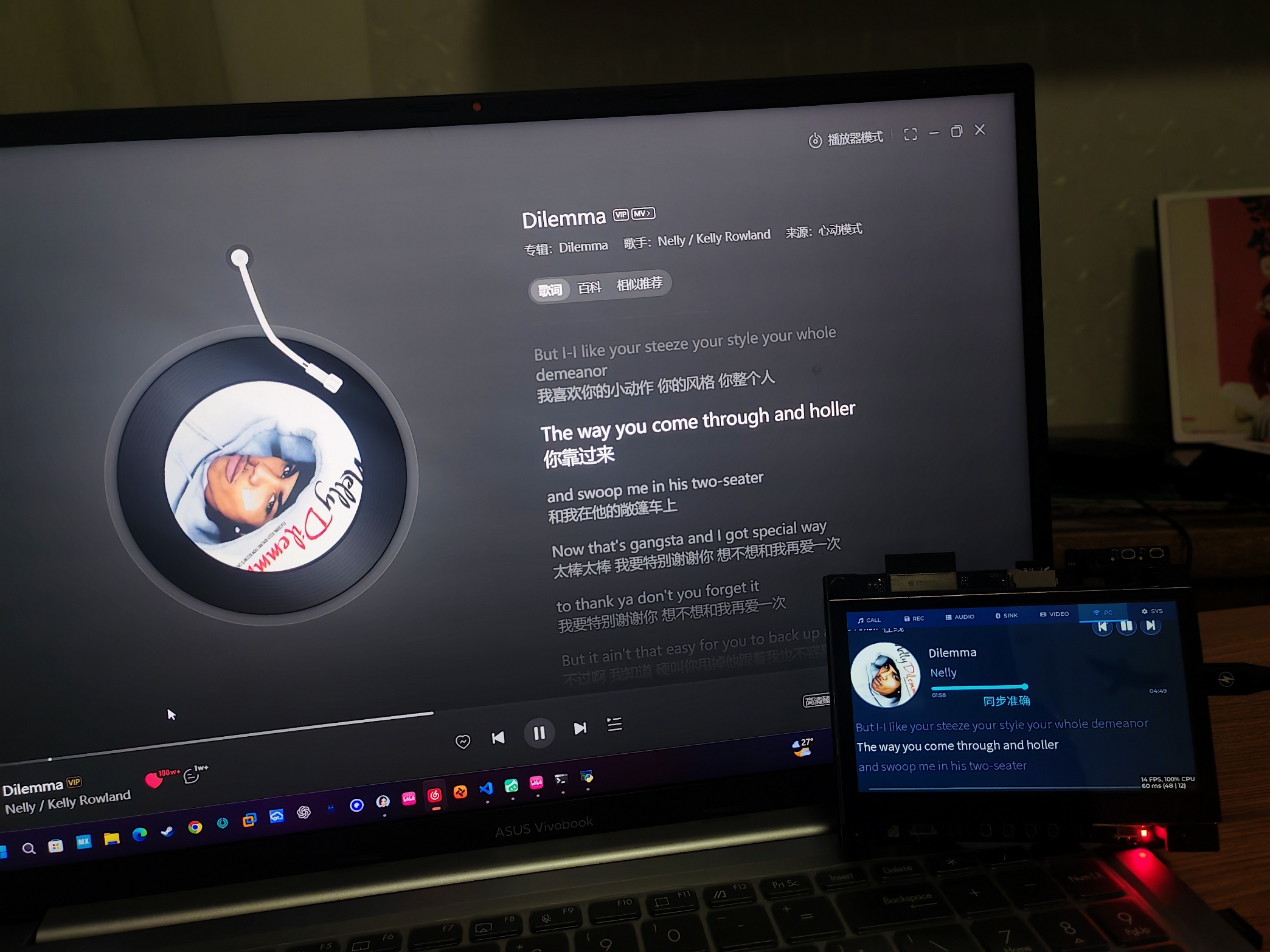
- PC PC Music Secondary Display: receives PC media playback information over LAN, shows rotating album art, scrolling lyrics, and supports quick media controls
- SYS System Settings: Wi‑Fi, Bluetooth, RGB lighting management, firmware version view, A/B slot OTA upgrade, storage and system status monitoring
Accompanied by a drop‑down dashboard, supporting SNTP network time synchronization and real‑time He‑Feng weather display. Audio uses a unified scheduling service, with mutually exclusive management of playback, recording, and intercom to avoid audio path conflicts.
Dual‑Firmware Partition Architecture
The onboard 16 MB Flash uses a three‑firmware‑slot design:
- ota_0 / ota_1: main firmware A/B dual slots, Wi‑Fi OTA rotates only between these two slots; on upgrade failure it automatically rolls back to prevent bricking
- uext dedicated slot: stores the USB expansion screen firmware independently; OTA upgrades do not overwrite this partition
Switch with the SET button: the main firmware can jump to the USB secondary screen; pressing SET in secondary‑screen mode automatically returns to the main system.
The USB secondary‑screen firmware is a separate project; when connected to Windows with the signed IDD driver, it is recognized as a standard 800×480 display supporting up to 60 FPS, and also supports five‑point touch.
Wi‑Fi OTA Upgrade (A/B Dual Slots)
The device acts as an HTTP client to actively pull firmware, reusing UDP for control paths and TCP for data transfer, without requiring external network access or reverse access from a PC.
- Supports version verification, SHA‑256 verification, resumable downloads; 256 KB segment hashes stored in NVS, allowing download recovery after interruption
- The upgrade interface is an LVGL full‑screen overlay; touch input is disabled during the upgrade process
- Multiple brick‑prevention mechanisms: firmware CRC check, image validity check, post‑upgrade self‑verification, Bootloader automatic rollback
- Supports bidirectional OTA: the device actively queries the PC for the latest firmware version and can initiate an upgrade with one press; manual slot switching is also supported
Project Architecture and AI Agent Development Closed Loop
The project uses a layered decoupled architecture, with the business middleware layer completely isolated from the LVGL UI layer; the UI does not directly manipulate hardware or audio peripherals, ensuring code standards and stability.
It also provides complete development guidelines, checklists, and automation scripts, forming an embedded development workflow that an AI Agent can execute directly: read specification → write code from template → compile → auto‑flash → script captures serial logs → automatically assess runtime status, iterative debugging.
Accompanying coding red‑line constraints avoid common RTOS, audio, PSRAM stack, and cache‑related crashes.
Hardware Information
- Main controller: ESP32‑S31, dual‑core RISC‑V 320 MHz
- Display: 4.3‑inch 800×480 RGB565 screen, GT1151 five‑point capacitive touch
- Audio: ES8389 audio codec, dual microphones, dual NS4150B amplifiers
- Storage: 16 MB Flash + 16 MB Octal PSRAM; LittleFS stores wallpaper assets, SD card stores audio, video, and recording files
- USB: Type‑A is a high‑speed OTG port (USB secondary screen); Type‑C is a debug serial port for flashing and log viewing
- Development environment: ESP‑IDF v6.1.0
Companion Host PC Software
Two PC programs are provided; use either one:
- PySide6 host pc_host: full functionality, LAN intercom, PC media information push, Wi‑Fi OTA firmware management, firmware archive logging
- C# lightweight pc_now_agent: captures Windows system media playback information and pushes it via UDP to the device for a music secondary display
Quick Start
- Install ESP‑IDF v6.1.0 using the EIM tool and activate the IDF terminal
- Compile the firmware and flash the main firmware; the first flash also writes the LittleFS asset partition
- Optional: flash the uext secondary‑screen firmware to its dedicated partition
- Install the PC host software, connect to the same LAN, and you can use intercom and PC music secondary‑display features
- USB secondary‑screen mode: connect the Type‑A port directly to a Windows PC, install the accompanying signed IDD driver, and the system will recognize it as an external monitor
Project Status
Completed: audio pipeline, LVGL interface, Wi‑Fi networking and weather, UDP intercom, SD‑card multimedia, Bluetooth A2DP, PC music secondary display, A/B dual‑slot OTA, USB secondary‑screen bidirectional switching.
This project is open‑source under the Apache‑2.0 license.
Comments (0)
Comments
Sign in to leave a comment