
desk-beam-------ESP32-S31 Desktop Secondary Screen Companion — Lyrics Display · Ambient Light · DeepSeek Usage Monitoring

This content is AI-translated and may differ from the original.
<h1 align="center">desk-beam</h1>
<p align="center">
<em>ESP32-S31 desktop secondary-screen companion — lyric display · ambient lighting · DeepSeek usage monitoring</em>
</p>
<p align="center">
<img alt="License" src="https://img.shields.io/badge/license-MIT-green"/>
<img alt="ESP-IDF" src="https://img.shields.io/badge/ESP--IDF-v6.2-blue"/>
<img alt="LVGL" src="https://img.shields.io/badge/LVGL-8.4-purple"/>
<img alt="Platform" src="https://img.shields.io/badge/platform-ESP32--S31-orange"/>
</p>
---
## 📖 Overview
**desk-beam** is a desktop secondary screen based on ESP32-S31, connecting to a PC-side service via WiFi/WebSocket, providing:
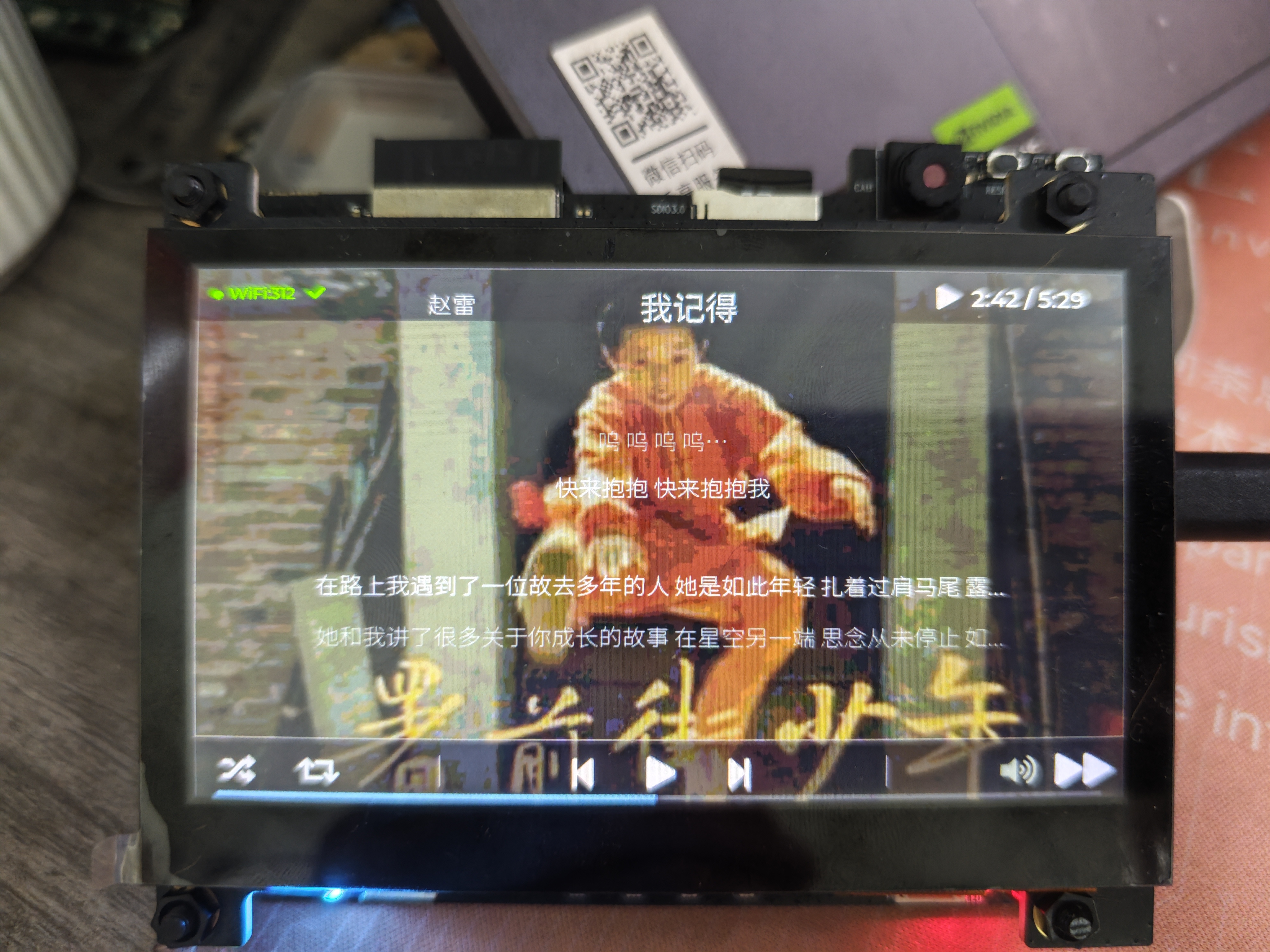
- 🎵 **Desktop lyrics + album cover** — sync scrolling lyrics and cover art from QQ Music, NetEase Cloud, etc.
- 🖼️ **Album cover display** — Now Playing mode shows the current song's cover (added in v2.0.0)
- 💡 **WS2812 ambient light** — reacts to music (pulse/breath/rainbow)
- 🎮 **Music remote** — remote playback control via ADC buttons
- 📊 **DeepSeek usage monitoring** — real-time view of API balance and consumption
- 🗂️ **SD card storage** — cache lyrics/cover and store configuration (added in v2.0.0)
```
QQ音乐/网易云 → Windows SMTC → PC 桥接服务 → WebSocket → ESP32 → LVGL 屏幕 + WS2812
```
---
## ✨ Features
- **Full-screen lyric interface** — LVGL 8.4 rendering, 6-line scroll, 4 display modes (lyrics/now playing/spectrum/info)
- **Chinese display** — pre-rendered Noto Sans SC Chinese font (20px + 28px RLE compressed)
- **WS2812 ambient light** — 3 LEDs, 4 effect modes (pulse/breath/rainbow/off), adjustable brightness
- **DeepSeek usage visualization** — balance card + consumption bar chart + model detail table
- **WiFi auto-connect** — STA mode + event group sync + timeout protection
- **WebSocket full-duplex** — auto-reconnect (exponential backoff) + JSON protocol
- **SD card support** — SDMMC 4-bit FATFS mount (optional)
- **Touch interaction** — GT1151 touch + ADC button dual input
- **Album cover display** — Now Playing mode shows album cover cached on SD card
---
## 🖥️ Demo
| Music lyric screen | Album cover screen (v2.0.0) | DeepSeek usage screen |
|:---:|:---:|:---:|
|  |  |  |
| DeepSeek usage improvements (v2.0.0) | New lyric page interface (v2.0.0) | |
|  |  | |
---
## 🛠️ Hardware
### Bill of Materials
| Component | Model | Quantity |
|------|------|:----:|
| SoC development board | ESP32-S31-Korvo-2-LCD | ×1 |
| LCD screen | ST7262E43 800×480 RGB565 parallel interface | ×1 |
| Touch chip | GT1151 (I2C) | ×1 |
| RGB LED | WS2812 | ×3 |
| SD card | microSD (for extended storage) | ×1 |
| Power | 5V USB-C | ×1 |
### Pin Definitions
| Function | GPIO | Bus |
|------|:----:|------|
| LCD data | GPIO8~36 (16bit) | RGB565 parallel |
| LCD sync | HSYNC=44, VSYNC=45, DE=43, PCLK=40 | — |
| Touch I2C | SDA=0, SCL=1 | I2C |
| WS2812 | GPIO37 | RMT TX |
| ADC buttons | GPIO42 | voltage‑divider array (×4 buttons) |
| SD card | CLK=24, CMD=25, D0~D3=20~23 | SDMMC 4-bit |
> See pin‑definition details in components/bsp/include/bsp/bsp_board.h
---
## 🚀 Quick Start
### 1️⃣ Environment Setup
- **ESP-IDF** v6.2+ (target chip `esp32s31`)
- **PSRAM** enabled (required for LVGL display buffer)
- Install dependencies:
```bash
# ESP-IDF component manager automatically installs LVGL + WebSocket etc.
idf.py set-target esp32s31
idf.py build
```
### 2️⃣ Configure WiFi and PC address
**Modify the configuration section in `main/main.c`:**
```c
// Lines 50‑57 — replace with your own info
#define WIFI_SSID "你的WiFi名称" // 2.4GHz only
#define WIFI_PASSWORD "你的WiFi密码"
#define PC_HOST "192.168.1.100" // IP of the PC running the service
#define PC_WS_PORT 8765 // WebSocket port (default)
```
> ⚠️ **Important**: Before committing, ensure `WIFI_SSID` / `WIFI_PASSWORD` are reverted to the placeholder `"xxxxxxxx"` to avoid exposing home WiFi credentials.
### 3️⃣ Flash
```bash
idf.py -p COMx flash monitor
```
### 4️⃣ Start PC-side service
See the [PC 端服务](#pc-端服务) section.
---
## 🏗️ Architecture
### Software Layers
```
┌─────────────────────────────────────────────────────────────┐
│ Application layer (main/) │
│ app_music_screen app_deepseek_screen app_led_effects │
│ app_ws_client app_network app_logic │
├─────────────────────────────────────────────────────────────┤
│ Hardware abstraction layer (components/) │
│ hal_display hal_led hal_key hal_sdcard bsp │
├─────────────────────────────────────────────────────────────┤
│ Middleware (managed_components/) │
│ LVGL 8.x esp_lvgl_port esp_websocket_client cJSON │
├─────────────────────────────────────────────────────────────┤
│ FreeRTOS + ESP-IDF │
└─────────────────────────────────────────────────────────────┘
```
### Task Scheduling
| Task | Priority | Stack size | Core | Responsibility |
|------|:------:|:------:|:----:|------|
| LVGL main loop | — | Inherited | — | `lv_timer_handler()` driver |
| `hal_key` | 5 | 4KB | — | ADC button scan + debounce |
| `app_ws` | 4 | 8KB | 0 | WebSocket send/receive + dispatch |
| `network_task` | 3 | 8KB | — | WiFi connect + status monitor |
| `app_led_effects` | 3 | 2KB | — | WS2812 effect frame rendering |
### Startup Flow
```
app_main()
├─ BSP init
├─ LCD init (RGB parallel)
├─ LVGL port registration (display+touch)
├─ Music screen creation
├─ DeepSeek screen creation
├─ LED effect task start
├─ Button scan task start
├─ Network task start (WiFi → WebSocket)
└─ LVGL main loop
```
---
## 💻 PC-side Service
### Install and start
```bash
cd pc_tools
pip install -r requirements.txt
python windows_media_server.py
```
After starting, it listens on `ws://0.0.0.0:8765`; the console prints the local LAN IP address, to be set in ESP32's `PC_HOST`.
### Lyric query priority
| Source | Description |
|------|------|
| 🥇 QQ Music API | SMTC Track ID direct, most accurate |
| 🥈 NetEase Cloud Music API | Generic title+artist search |
| 🥉 LRCLIB | Overseas public API fallback |
### Hotkeys
| Key | Function |
|:----:|------|
| `P` | Pause/resume WebSocket broadcast |
| `Q` | Quit server |
### DeepSeek usage data integration
The PC side can read a local JSON file and push DeepSeek API usage data to the ESP32 for display.
#### Command-line mode (direct file path)
```bash
python windows_media_server.py --deepseek-file D:\path\to\deepseek_usage_data.json
```
#### Integrated WorkBuddy automated scraping (recommended)
This project includes a WorkBuddy Skill that automatically scrapes the DeepSeek usage page every hour, generating a JSON file for the ESP32 to read.
**Data flow:**
```
Edge browser (logged into platform.deepseek.com)
↓ CDP automated scrape (once per hour)
deepseek_usage_data.json (local file)
↓ windows_media_server.py reads every 300 s
WebSocket → deepseek_usage message
ESP32 screen (DeepSeek usage page)
```
**Prerequisites:**
1. [Install WorkBuddy](https://workbuddy.ai) (Claude Code plugin)
2. Log into Edge browser at [platform.deepseek.com](https://platform.deepseek.com)
3. Enable Edge remote debugging: visit `edge://inspect/#remote-debugging` and check **"Allow remote debugging for this browser instance"**
4. Install the Skill file (see below)
#### WorkBuddy Skill installation
```bash
# Skill definition
Comments (0)
Comments
Sign in to leave a comment