
esp32s31-Beginner Tutorial

This content is AI-translated and may differ from the original.
# Awesome-ESP32-S31 🚀
> Espressif ESP32-S31-Korvo development board resource repository | Beginner-friendly tutorial + continuously updated fun embedded projects
[](./LICENSE)
## 📌 Repository Overview
This repository is built on the **ESP32-S31-Korvo V1.1 multimedia development board**, focusing on **zero‑experience friendly + practical fun projects**: from environment setup tutorials to lighting, display, voice, camera, and IoT creative demos that are continuously updated; based on ESP-IDF + LVGL + official BSP development, all code can be compiled and flashed with a single command.
Hardware basics: ESP32-S31 (RISC‑V dual‑core 320 MHz) + 16 MB PSRAM + 8~32 MB Flash, onboard 4.3‑inch RGB touch screen, OV3660 camera, dual microphones, speaker, programmable RGB LEDs, SD card slot—naturally suited for multimedia, voice AI, and machine‑vision creative projects.
## 📂 Repository Directory Structure (planned in advance for easy addition of new projects)
awesome-esp32-s31
├── assets/
│ └── tutorial-images/ # tutorial images, project screenshots, hardware photos
├── docs/
│ └── 01-esp32s31-korvo-guide.md # beginner tutorial (environment + basic screen lighting)
├── examples/ # source code for all small projects
│ ├── 01_basic_demo/ # basic introductory examples (lighting, buttons, screen basics)
│ ├── 02_lcd_lvgl_demo/ # LVGL screen interaction projects (GIFs, UI control panels)
│ ├── 03_audio_voice/ # microphone + speaker voice projects (wake‑up, recording/playback)
│ ├── 04_camera_vision/ # camera image projects (photo to SD, image recognition)
│ └── 05_iot_wifi/ # Wi‑Fi IoT projects (cloud control, data reporting)
├── docs/extra_project_doc/ # independent documentation for each new project
├── LICENSE
└── README.md
## 📖 Quick Jump to Introductory Docs
👉 [Zero‑Experience Getting‑Started Guide | ESP‑IDF + VSCode + AI‑Assisted Programming Tutorial](./docs/01-esp32s31-korvo-guide.md)
> The tutorial includes: one‑click environment setup, RGB screen lighting, touch driver, LVGL development, full AI‑assisted programming workflow—essential for beginners.
## 🎯 Projects Currently Available
> Click a project name to jump to its source directory, with screenshots and usage instructions attached.
### ✅ Basic & Screen Projects
1. **RGB Three‑Color Breathing LED**|Path: `examples/01_basic_demo/rgb_breath_led`
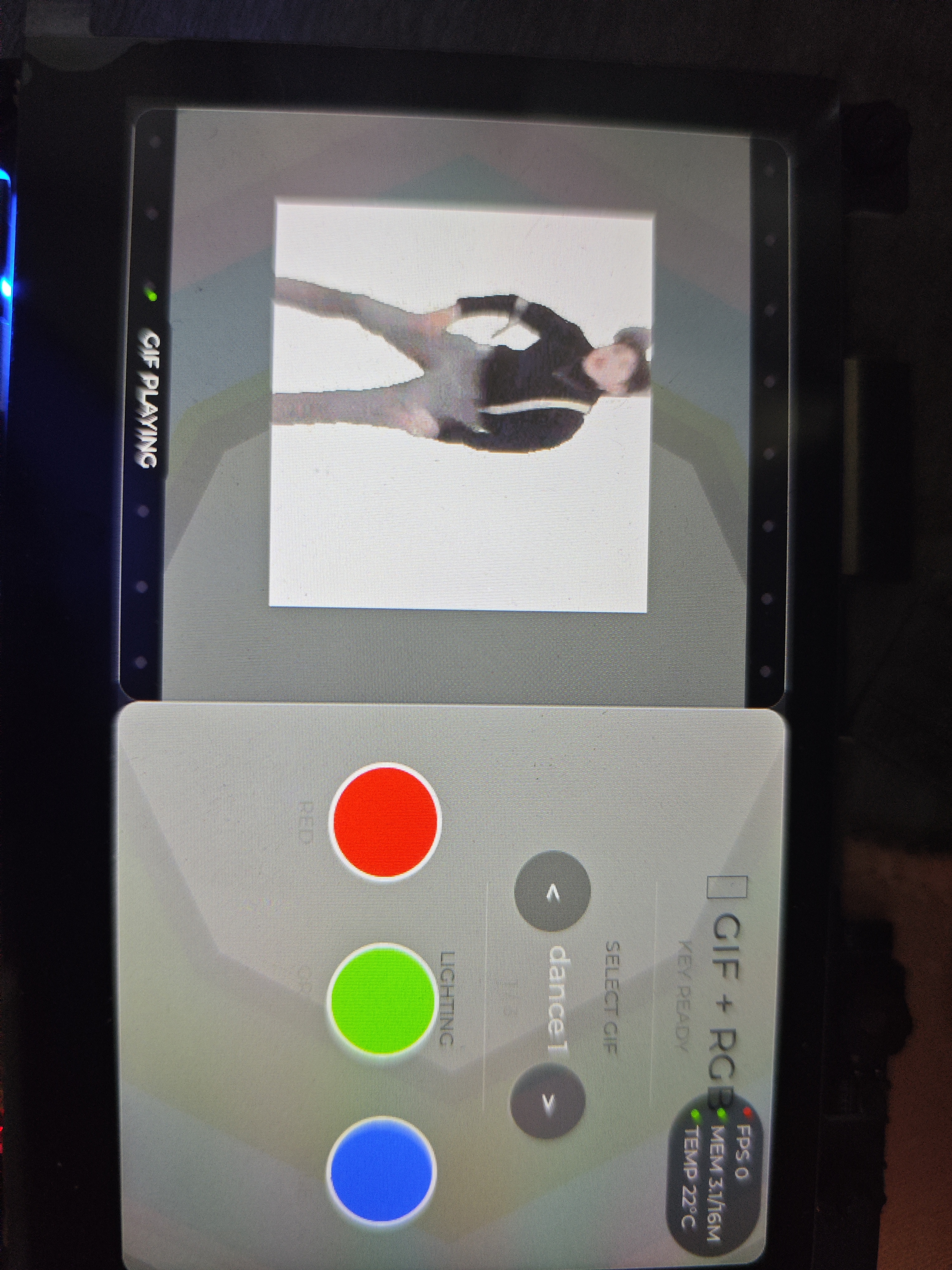
2. **LVGL Split‑Screen Controller: GIF Playback + Touch Button Controls RGB LED**|Path: `examples/02_lcd_lvgl_demo/lvgl_gif_led_ctrl`

## ⏳ In Development & Future Planned Fun Projects (placeholders to be filled as they are completed)
### 🎤 Voice & Audio Series
- [ ] Project 1: Dual‑mic voice wake‑up + voice command control of onboard lighting
- [ ] Project 2: Portable recorder/player (record to SD card, local playback)
- [ ] Project 3: Simple voice changer (real‑time pitch shift + speaker output)
### 📷 Camera & Vision Series
- [ ] Project 1: Touchscreen one‑click photo, JPG saved automatically to MicroSD
- [ ] Project 2: Real‑time viewfinder on screen (LCD shows live camera feed)
- [ ] Project 3: Simple face detection (leveraging S31 built‑in AI accelerator)
### 🌐 Wi‑Fi IoT Series
- [ ] Project 1: Mobile web page remote control of RGB lighting + online screen text editing
- [ ] Project 2: Environmental data collection (external temperature/humidity), data reporting to cloud dashboard
- [ ] Project 3: Simple wireless screen casting (PC sends images, LCD displays them)
### 🎮 Fun Creative Mini Projects
- [ ] Project 1: LVGL touch‑screen mini‑games (Snake / Whac‑a‑Mole)
- [ ] Project 2: Desktop electronic photo album (read images from SD card and auto‑rotate)
- [ ] Project 3: Mini spectrum analyzer (microphone input, screen draws audio spectrum)
## ⚙️ Unified Development Environment Standards
All repository projects share a common development configuration; the same settings apply to every demo:
| Tool | Selection Explanation |
| ---- | ---- |
| Build Framework | ESP‑IDF Master branch (EIM tool one‑click install) |
| Development IDE | VSCode + CodeBuddy (DeepSeek V4 Pro AI‑assisted development) /claude code+deepseek v4 flash |
| UI Library | LVGL v8.4.0 + esp_lvgl_port v2.8.0 |
| Hardware Driver | Espressif official ESP32‑S31‑Korvo BSP |
## 🚀 Quick Steps to Run a Project
1. Clone the repository locally
```bash
git clone https://github.com/yunxiao11xie/awesome-esp32-s31.git
```
Refer to the docs introductory guide to set up the ESP‑IDF development environment
Enter any project folder, run idf.py set-target esp32s31 to configure the chip, then compile + flash
Comments (1)
Comments
Sign in to leave a comment